
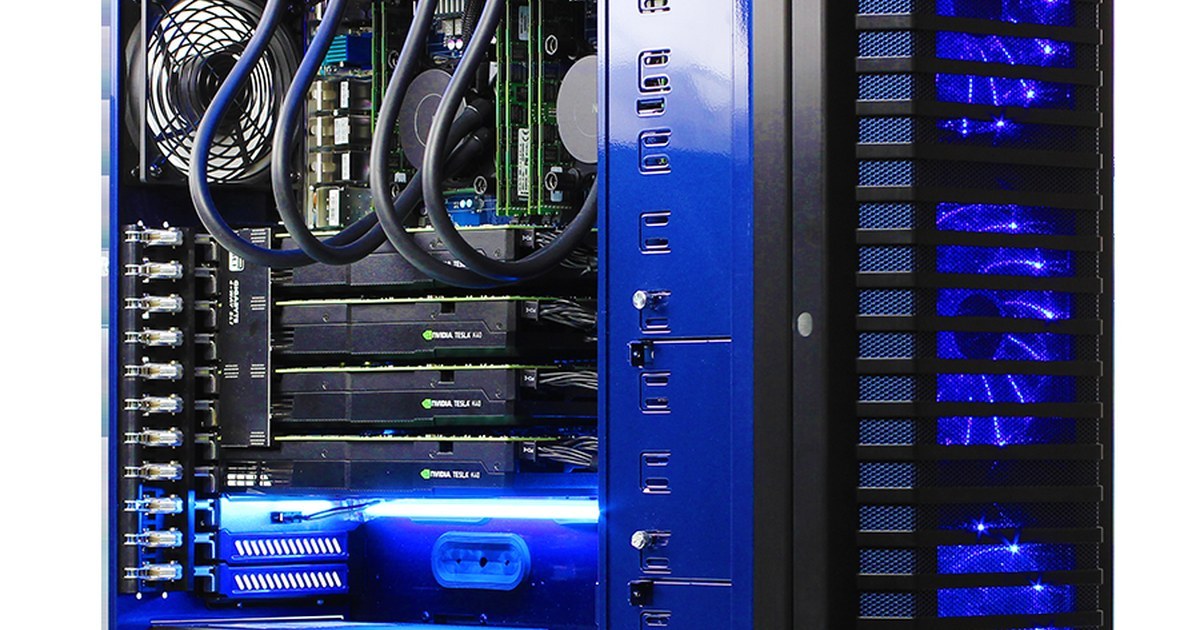
MSI showcased the XpertStation WS300 at SC26, a deskside system based on the NVIDIA DGX Station platform and the GB300 Grace Blackwell Ultra Desktop Superchip. MSI lists up to 748 GB of coherent ECC memory, liquid cooling and two 400GbE connections through NVIDIA ConnectX-8. Teams developing or testing large AI models locally can compare it with a rack server or remote system using the same workload and acceptance criteria.
MSI's SC26 report on MSI’s announcement presents an identifiable commercial model, but an event demonstration does not establish the availability, price, configuration or delivery date of a particular offer. Confirm support and service where the system will be used.
Read the memory specification carefully
MSI states up to 748 GB of coherent ECC memory and 7.1 TB/s HBM3e GPU memory bandwidth. These are published platform figures. The total coherent-memory figure must not automatically be treated as the amount of local GPU memory available at the same bandwidth. A Japanese supplier’s specifications list 496 GB LPDDR5X CPU memory and 252 GB HBM3e GPU memory for its configuration. Verify the software access model and usable capacity for the target application.
MSI also describes dual 400GbE connections and liquid cooling. Confirm the exact adapters, transceivers, cables, switches and cooling arrangement in the bill of materials. A high-speed interface in an announcement does not establish that the necessary external infrastructure is included.
The company describes planned Windows support for local AI development. That forward-looking statement does not confirm that every OS release or application is supported at the time of purchase. Check the delivered operating system, drivers, development libraries and vendor support matrix for the specific configuration.
Workstation or rack server?
A deskside system can be useful for experiments, developer workflows and verifying a pipeline before deploying it to shared infrastructure. A multi-server rack offers different scaling and service arrangements, with corresponding facility and network requirements. Neither option is universally better: compare them on the model, concurrency, operational responsibility and reproducible cost of the complete deployment.
A coherent CPU/GPU memory design and separate discrete GPU memories have different access paths. Total gigabytes alone do not establish latency or achieved bandwidth. Determine where weights, cache and temporary buffers reside, what happens when faster memory fills, and how the runtime uses the available memory.
Check dimensions, weight, electrical input, room temperature, noise and heat rejection for the actual workstation. Liquid cooling inside a system does not imply zero heat entering the room or compatibility with any external coolant loop. Obtain the manufacturer's installation and service instructions.
A memory sizing example
Assume an illustrative model has 200 billion parameters stored at two bytes each. The weights require approximately 400 billion bytes, or 400 GB in decimal units. Adding assumed cache of 80 GB and work buffers of 40 GB gives 520 GB before reserve and other allocations.
This example does not establish that the model fits or performs well on WS300. Quantization, cache growth, temporary copies, the software stack and the distribution of memory can change the result. The 748 GB announced total is not a guarantee that all operations have the same GPU-local bandwidth. Measure peak allocation and latency using the actual model and configuration.
Network calculations need boundaries
Two 400 Gb/s ports sum to 800 Gb/s in one direction, or 100 GB/s after dividing by eight, before protocol overhead. This is arithmetic, not application throughput. Link direction, adapters, cables, switch configuration, storage and software all affect the useful rate.
For example, reading 400 GB at an assumed useful 25 GB/s would take at least 16 seconds before latency, contention and processing. The 25 GB/s figure is hypothetical and is not a WS300 benchmark. Measure the complete storage path with the expected concurrent workload.
Compare the full workload
Fix the model revision, weight format, prompt and output lengths, concurrency and quality target. For inference measure time to first token, subsequent token latency and tail latency. For training or fine-tuning record step time, effective batch and correctness. Save OS, driver, framework and library versions along with memory placement and observed peak allocation.
Run long enough to identify behaviour under sustained load. If multiple stations are planned, verify the network topology, management and recovery process separately. Fast ports alone do not prove that an arbitrary application scales across machines. These examples are calculations, not tests performed by AI Server Lab.
Operating a local system
Local deployment lets the organization control data access, but security still needs account management, updates, secret handling and log retention. Agree backup and recovery procedures for models, input data and results. If the only station is unavailable, determine whether a workload can be moved elsewhere and how restored files will be validated. Confirm the capabilities of the installed software release.
Before ordering
Request the complete SKU, memory and storage breakdown, supported operating systems, input power, facility requirements, warranty and local service arrangements. Agree a workload-specific acceptance test and stability criteria. Review server selection or contact AI Server Lab with the model and deployment constraints. Pricing and availability depend on the actual supplier offer.