
The short answer
An eight-GPU NVIDIA HGX H200 server combines eight H200 SXM accelerators on an HGX platform. NVIDIA specifies 141 GB of HBM3e memory per H200 SXM, giving the node 1,128 GB in aggregate, commonly described as about 1.1 TB. This is the sum of eight devices, not a single GPU with 1.1 TB of memory. Whether a model can use it depends on how the software partitions its weights, cache and operations across GPUs.
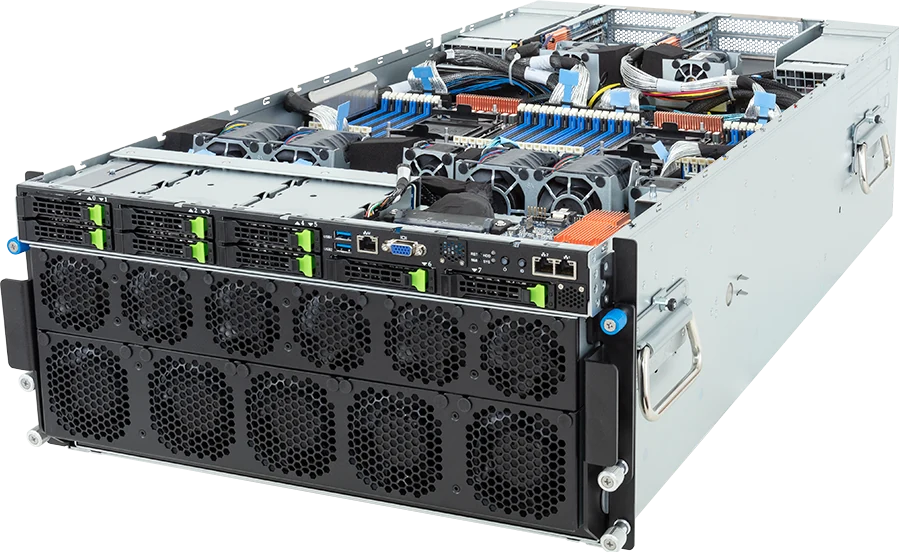
The GPU platform is only part of a server. A purchase also needs a compatible chassis, processors, system RAM, storage, network interfaces, power delivery and cooling. A GIGABYTE G593-SD1-AAX3 is one example of a 5U system for an HGX H200 baseboard; it is not the only possible implementation, and a listing for the chassis does not establish the components installed in a particular offer.
What 141 GB per GPU means for an LLM
High-bandwidth memory holds model weights, runtime buffers and data needed during execution. A larger allocation per GPU can make it easier to run larger models or to serve longer contexts and more simultaneous requests. It does not guarantee a particular context length, number of users or tokens per second: those depend on the model, precision, runtime, batching and latency target.
A simple capacity exercise helps expose the assumptions. Suppose a model has 70 billion parameters and each stored weight occupies two bytes. The weights alone require roughly 140 billion bytes, or 140 GB in decimal units. That is only a theoretical weight estimate: it excludes the KV cache, temporary tensors, runtime and allocation overhead. It is not evidence that the complete workload fits on one 141 GB GPU. Quantization can reduce the storage needed for weights, but its actual memory use and output quality must be measured for the model and runtime being considered.
For training or fine-tuning, account separately for activations, gradients and optimizer states. The total can exceed weight storage by a substantial margin. Before choosing a node, ask the software team for a memory profile measured at the intended precision, batch size, sequence length and concurrency, plus the overhead required for safe operation.
Eight accelerators: aggregate memory and interconnect
NVIDIA lists 4.8 TB/s of HBM bandwidth per H200 SXM and 38.4 TB/s as the aggregate figure for eight GPUs. The latter is a sum of device bandwidths; it should not be treated as the speed at which any one GPU can read another GPU's memory. HBM bandwidth, GPU-to-GPU interconnect bandwidth and external network throughput describe different paths.
The HGX H200 baseboard uses NVLink and NVSwitch for high-speed communication among the GPUs. This can matter for model or tensor parallelism, but it does not make every application automatically scale across eight devices. Confirm the parallelism methods supported by the selected framework and check how traffic changes as batch size and concurrency rise.
Benchmark candidates using the same model revision, prompt and output lengths, precision, runtime version, batch policy and latency target. Report throughput alongside response latency and GPU memory usage. Where practical, compare one, two, four and eight GPUs; the largest node may be unnecessary for a smaller service or may not meet a particular latency target as configured.
Example platform: GIGABYTE G593-SD1-AAX3
GIGABYTE describes the G593-SD1-AAX3 as a 5U, dual-socket system supporting an eight-GPU NVIDIA HGX H200 platform. The manufacturer lists Intel Xeon Scalable fourth- or fifth-generation processors, 32 DDR5 RDIMM slots and eight front 2.5-inch drive bays. These are platform capabilities; CPU models, installed DIMMs, drives and network cards must be confirmed in the actual specification.
| Item | Manufacturer platform detail | Confirm in the proposal |
|---|---|---|
| GPU platform | Eight H200 SXM GPUs on HGX | Exact GPU and baseboard configuration |
| CPU | Two Intel Xeon Scalable sockets | CPU generation, model and installed quantity |
| System memory | 32 DDR5 RDIMM slots | DIMM capacity, speed and population |
| Drive bays | Eight front 2.5-inch bays | Installed drives, interface and capacity |
| Chassis | 5U rack server | Rack depth, service clearance and handling plan |
| Network | Platform-dependent options | Adapter models, ports, cables and optics |
A bill of materials should list the server SKU and every installed component rather than relying on a broad platform description. Check the current manufacturer's specification for revisions and compatibility, and compare the delivered equipment with the agreed bill of materials during acceptance.
H200 SXM versus H200 NVL
H200 SXM is used in the HGX platform discussed here. H200 NVL is a PCIe-form-factor accelerator intended for a different set of server configurations. NVIDIA describes H200 NVL systems with up to four GPUs connected using NVLink bridges, subject to platform support. The two options should not be treated as interchangeable: chassis support, power, cooling, physical layout and interconnect differ.
Choose the form factor by starting with the workload and supported server design. For a smaller deployment, an appropriately validated PCIe system may be worth comparing. For an eight-GPU HGX node, verify the application can use its scale and interconnect. Compare complete systems under the same workload rather than comparing GPU memory alone.
Power, cooling and site readiness
Do not size the facility by multiplying a marketing GPU power number alone. Request the actual server configuration's rated input, expected operating draw, redundant power-supply arrangement and electrical requirements from the supplier or manufacturer. Establish how input feeds, circuit capacity, connectors and failure scenarios fit the site's design. Power-supply nameplate capacity is not the same thing as measured operating consumption.
For air-cooled equipment, check inlet conditions, rack airflow, hot and cold aisle containment, allowable inlet temperature and service clearance. Confirm the chassis depth, loaded weight, rail kit and installation procedure with the data centre. If liquid cooling is proposed for a different system, validate that system's own coolant and facility requirements; do not assume that every H200 server uses the same cooling design.
Procurement and acceptance checklist
- State the model or training job, target throughput and latency, expected concurrency, context length, precision and growth assumptions.
- Ask for the full server SKU and installed GPU, CPU, memory, storage, NIC and cable list, including compatible software and firmware versions.
- Document the intended GPU partitioning and benchmark procedure. Record the workload, runtime, inputs, outputs, warm-up and measurement period.
- Obtain the power, cooling, rack, weight and service-clearance requirements for the actual configuration and have the site review them.
- Confirm seller, warranty route, documentation, delivery terms and any local constraints in the commercial proposal. Availability and price are specific to the enquiry.
- On delivery, compare serial numbers and installed components against the agreed specification, then run the agreed health and workload checks before acceptance.
An eight-GPU node can support demanding distributed workloads, but it is not automatically the best fit for every inference service. Start with the workload and facility constraints, then compare complete systems using reproducible measurements. Explore H200 server options or contact AI Server Lab to discuss a configuration.